Table of Contents
Chattrik allows you to block your widget from loading in selected countries, giving you more control over its accessibility. This is especially useful if your services are region-specific or you want to prevent unauthorized use from outside your target markets. By configuring the blocked countries option, you can secure your platform, reduce spam traffic, and ensure your support team focuses only on relevant visitors.
Step 1: Log in to Your Dashboard
- Log in to your Chattrik dashboard.
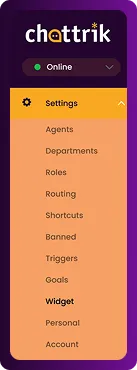
- Navigate to Settings and select Widget from the menu.
Step 2: Locate Blocked Countries Section
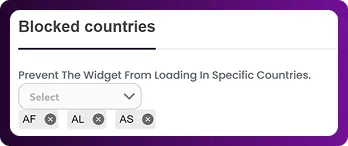
- Go to Security→ Blocked Countries
- This feature manages regional restrictions for your widget.

Step 3: Select Countries to Block
- From the list, choose the countries where you don’t want the widget to appear.
- You can select multiple countries as needed.

Step 4: Remove a Selected Country
- If you’ve added a country by mistake, you can easily remove it.
- Simply click the cross (×) icon next to the country name.
- The country will be deselected instantly.
Step 5: Confirm and Save
- Review your selections to ensure accuracy.
- Click Save Changes to apply restrictions immediately.