Empower Your Team with Smarter Chat Management

Chattrik makes it easy to manage agents, optimize workflows, and ensure every conversation is handled efficiently no matter your team's size.

Complete Control, Maximum Efficiency

From setting roles to managing shifts and chat limits, Chattrik gives you all the tools you need to build a responsive and well-coordinated support team.

Personalized Identity Icon

Personalized Identity

Assign each agent a unique profile with name, role, and display picture for easy recognition.

Role-Based Access Icon

Role-Based Access

Define permissions and access levels directly from the agent’s profile.

Performance Snapshot Icon

Performance Snapshot

View key metrics like chat count, satisfaction score, and availability history at a glance.
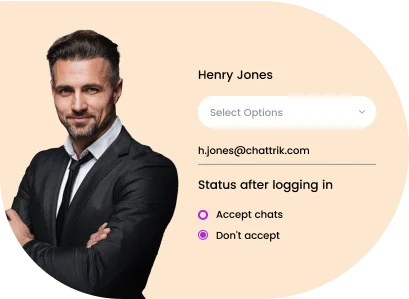
Chattrik agent profile setup showing login status options.
Custom Roles Icon

Custom Roles

Assign roles like Admin, Supervisor, or Agent with defined permissions.

Permission Control Icon

Permission Control

Limit access based on roles for better data security.

Task Clarity Icon

Task Clarity

Help teams understand responsibilities with clearly defined roles.
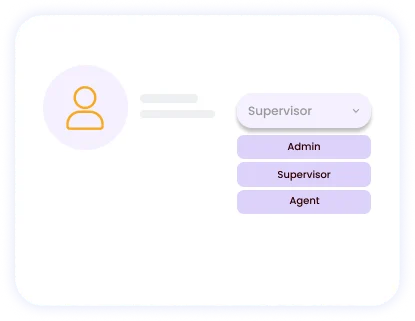
Chattrik user role configuration menu with Admin, Supervisor, and Agent options.
Smart Chat Distribution Icon

Smart Chat Distribution

Automatically route incoming chats to the most suitable agents.

Department-Based Routing Icon

Department-Based Routing

Direct queries to relevant departments based on visitor input.

Workload Balancing Icon

Workload Balancing

Distribute chats evenly to avoid agent overload and delays.
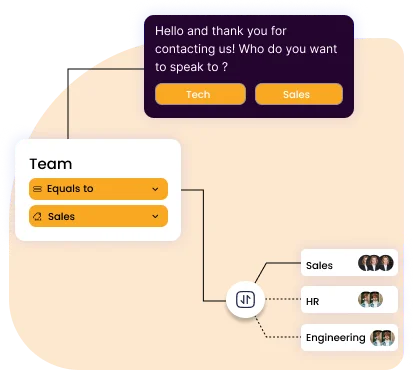
Chattrik routing diagram directing web traffic to designated teams.
Live Chat View Icon

Live Chat View

Supervisors can observe ongoing chats in real time.

Silent Coaching Icon

Silent Coaching

Guide agents discreetly without interrupting the customer conversation.

Intervention Control Icon

Intervention Control

Jump into conversations when necessary for escalated support.
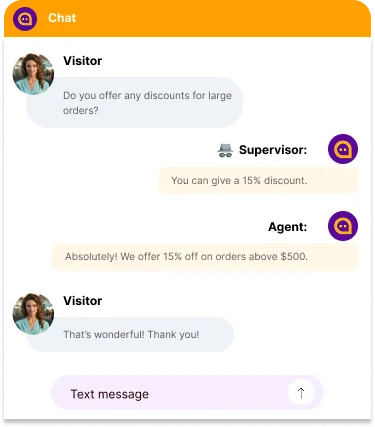
live-chat box showing a supervisor monitoring and advising an agent.
Capacity Control Icon

Capacity Control

Set maximum simultaneous chats per agent to maintain quality.

Automatic Queueing Icon

Automatic Queueing

Excess chats are queued automatically for better flow.

Prevent Burnout Icon

Prevent Burnout

Avoid overloading agents to ensure consistent performance.
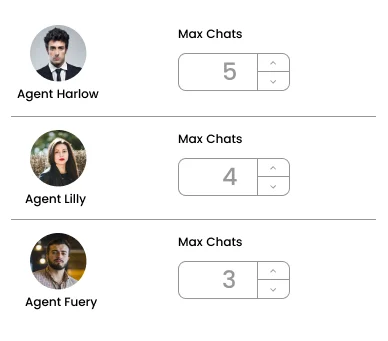
Chattrik chat limit configuration panel for active agents.
Team Segmentation Icon

Team Segmentation

Group agents into departments like Sales, Support, or Billing.

Targeted Routing Icon

Targeted Routing

Route chats based on department for specialized assistance.

Performance Insights Icon

Performance Insights

Monitor analytics department-wise for better decision-making.
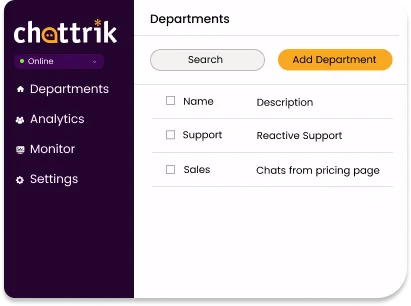
Alternate Text
Alternate Text

Shift Scheduling

Plan agent shifts in advance to ensure 24/7 coverage.

Alternate Text

Availability Planning

Set work hours per agent to maintain operational clarity.

Alternate Text

Rotation Management

Easily create recurring or rotating shifts to avoid overlaps.
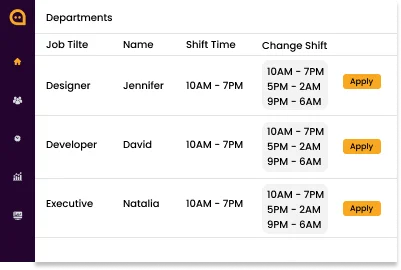
Chattrik department shift management table displaying staff schedules.

Frequently Asked Questions

Have questions? We’ve got answers. Here are the most common things people ask about Chattrik.

It assists you in organizing your agents, defining roles, and supervising your support group from a single location.
Yes, you can use many agents to reply to the conversations of the customers.
Yes, you can assign different roles like supervisor, agent or admin that vary the permissions.
Yes, Chattrik supplies various types of performance indicators.
Yes, the supervisor can see the chats that are ongoing.
Yes, you can restrict the no. Of conversations that a team agent can undertake.
Yes, you can organize your agents’ shifts and also control their availability.
Yes, you can customize the permissions for every user in your customer service team according to his/her position.
Yes, it will help to serve the growing group that handles the majority of clients.
Yes, they will operate jointly in order to serve customers.
Yes, since it centralized the management and also contains collaboration tools.
It makes your customer group accountable and enhance the performance of the customers.

Start 30-day free trial at Chattrik

Explore premium chat features, boost support efficiency, and secure your conversations.

WhatsApp Chat