See Who’s Browsing—Before They Even Speak

Track every visitor in real time and turn silent browsers into engaged customers instantly.

What Is Live Visitor Monitoring?

Live Visitor Monitoring gives you a real-time dashboard of everyone currently active on your website, allowing your agents to instantly see how many visitors are online, which pages they’re viewing, how long they’ve spent on each page, what device they’re using, whether they’re new or returning, and even their geographical location. With this immediate visibility into visitor behavior, your team understands customer intent long before a chat begins—making every interaction more informed, timely, and effective.

Visitor

Shows the visitor’s name or identifier along with their live activity status.

Time

Displays how long the visitor has been active on your website.

Current Page

Indicates the exact page the visitor is currently viewing in real time.

Technology

Shows the browser and device the visitor is using to access your site.
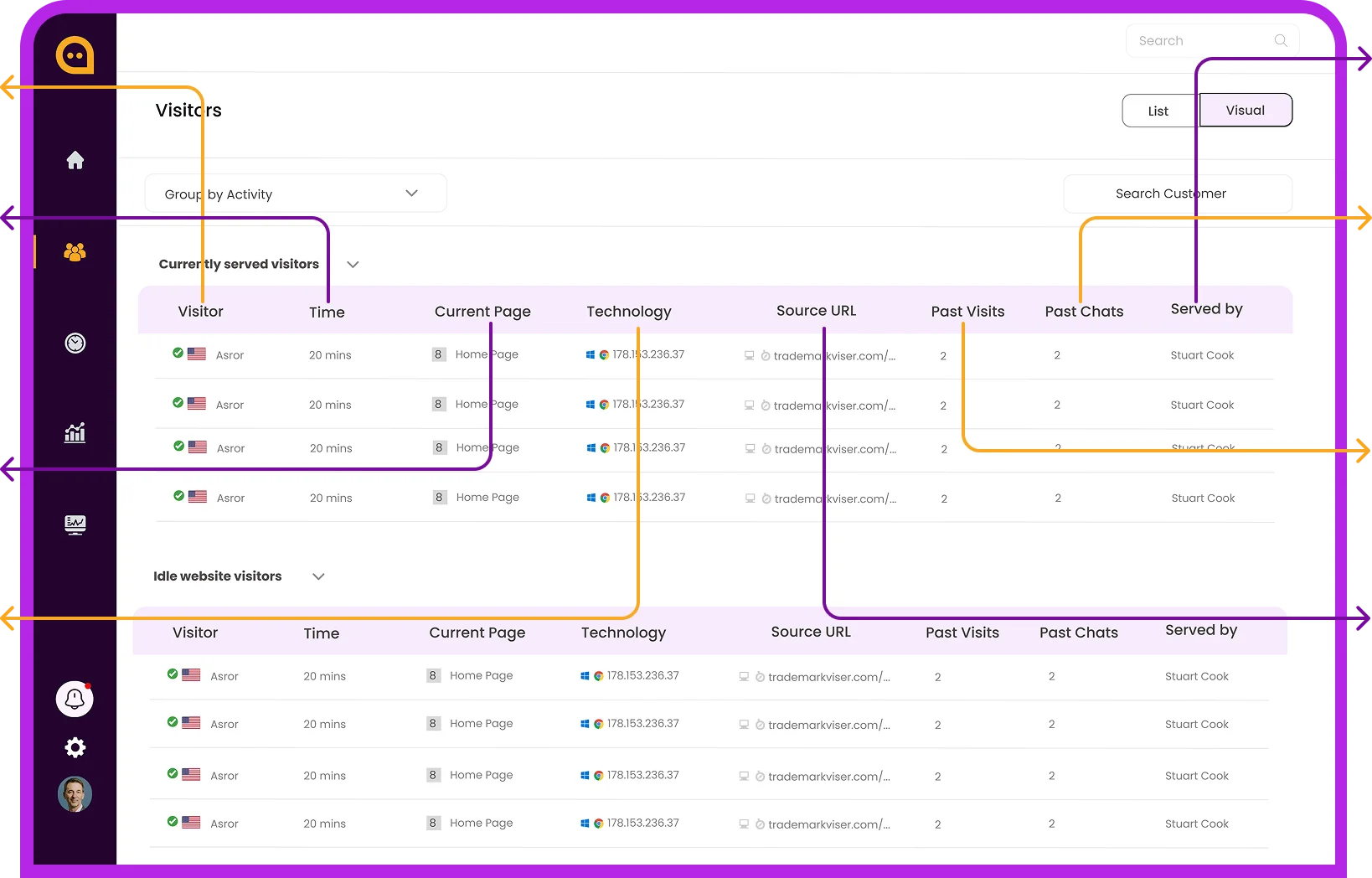
Chattrik live visitor monitoring interface showing metrics like active time, technology, and source URL.

Served By

Indicates which agent is currently handling or assigned to the visitor.

Past Chats

Displays how many previous conversations this visitor has had with your team.

Past Visits

Shows the total number of pages the visitor has viewed during their session.

Source URL

Reveals where the visitor came from—such as a campaign link, website, or referral.
Start Tracking Visitors in Real Time Boost Engagement From Day One

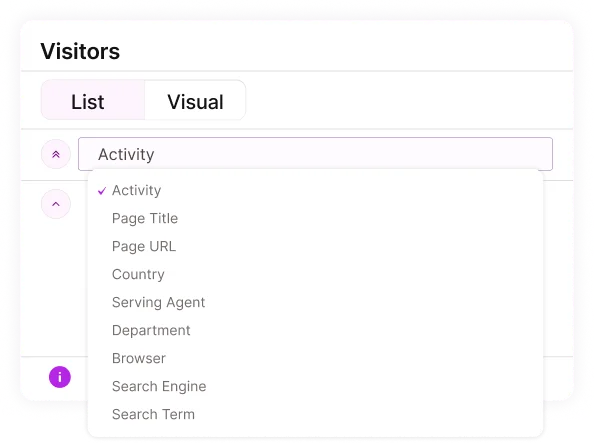
A filtering dropdown menu inside the Chattrik dashboard showing options to sort visitors by activity or browser.

Monitor Visitors Through Smart, Dynamic Grouping

Chattrik’s visitor grouping feature lets you monitor traffic from multiple perspectives, making it easier to understand behavior at a glance. You can view visitors by their activity, the page title or URL they’re on, country (detected through IP), serving agent, department, browser, or even the search engine and search terms that led them to your site. These dynamic groups help your team instantly spot patterns, prioritize conversations, and tailor engagement strategies in real time.

High-Traffic Dashboard for Peak Performance

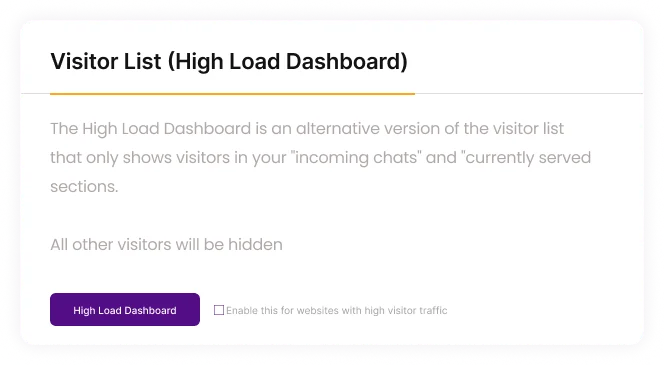
During heavy traffic (5,000+ visitors), Chattrik’s High Load Dashboard keeps things fast by showing only incoming and active chats. Enable it in Settings > Account > Visitor List, and your dashboard will auto-optimize to maintain smooth performance.

An explanatory popup window detailing the purpose and benefits of the Chattrik High Load Dashboard feature.

Advantages That Elevate Every Interaction

Experience tools that give your team a clear engagement advantage.

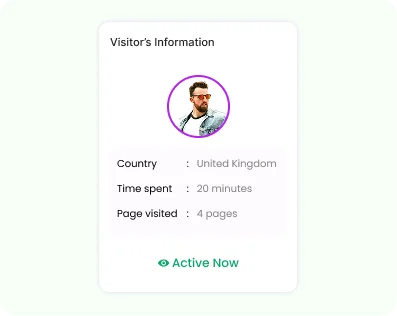
A card layout showing live customer details including country, time spent on site, and page visit metrics.

Spot High-Intent Visitors Instantly

Quickly identify who’s ready to convert based on their actions and time spent on key pages.

An orange Chattrik proactive chat pop-up box saying

Reach Out at the Perfect Moment

Automatically engage your users with personalized custom actions.

A support specialist with a headset smiling at a laptop displaying a visitor tracking user activity path popup.

Understand Visitor Behavior in Seconds

See page paths, time spent, and activity patterns to guide better conversations.

Why Live Visitor Monitoring Matters

It helps you spot intent, act faster, and turn real-time insights into meaningful conversations.

You can instantly see:

Chattrik shows where visitors are browsing from, helping you tailor greetings and make conversations feel more personal.

Quickly understand intent by tracking recently viewed pages, allowing you to offer timely, relevant recommendations.

Give agents actionable data so every conversation starts with context.
A visual list of active users categorized by their national flag profiles, web browser badges, and operating systems.

Frequently Asked Questions

Have questions? We’ve got answers. Here are the most common things people ask about Chattrik.

Live Visitor Monitoring allows you to identify and track people who are currently viewing your website and see what they are doing.
Live visitor monitoring will assist your team in identifying your most interested visitors and reaching out to them before they exit your site.
With Live Visitor Monitoring, you will be able to view information about who your visitors are, what pages they are visiting, what they do on your website and more.
With Chattrik’s Live Visitor Monitoring feature, you will be able to see what page each of your website visitors are viewing live.
Live Visitor Monitoring empowers your team to initiate a sale when visitors are on the brink of closing and help prevent sales from being lost.
Once a visitor begins browsing your site, your team can engage with him/her to start an interactive conversation.
If a visitor’s website behavior is enabled and can be monitored by the live monitor tool, he/she will be identified by Chattrik’s system.
Your entire team can make use of the live visitor monitoring system at the same time to assist your most active visitors.
Real time insights that you can glean will help your agents have the most personalized conversations.
Your website visitors are continuously updated as they actively look at your website.
No setup is required, except installation of the tracking code for your website from Chattrik.
It enables you to identify purchase intent, start proactive sales conversations and enhance your business sales conversion rates.

Start 30-day free trial at Chattrik

Explore premium chat features, boost support efficiency, and secure your conversations.

WhatsApp Chat