Always On, Even When You’re Off

Set your chat availability so your visitors get instant support during work hours and seamless follow-ups when you’re away.

What is Chattrik’s Operating Hours?

With Chattrik’s Operating Hours feature, you decide exactly when your team is available to chat. Ensure your visitors get timely responses during business hours and automated offline messages outside them—boosting satisfaction while keeping your team stress-free.
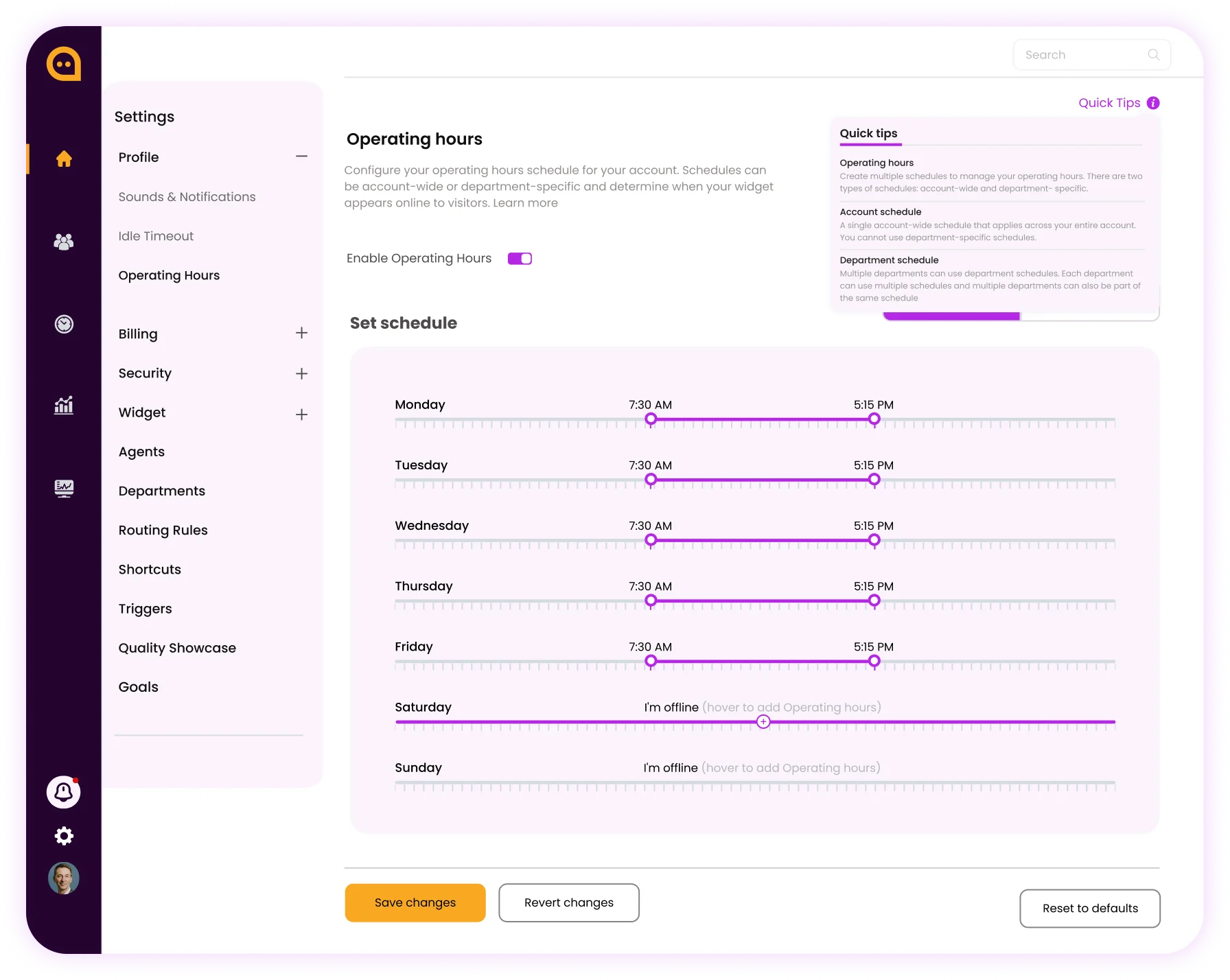
Chattrik dashboard interface showing weekly timeline sliders to configure daily chat widget operating hours.
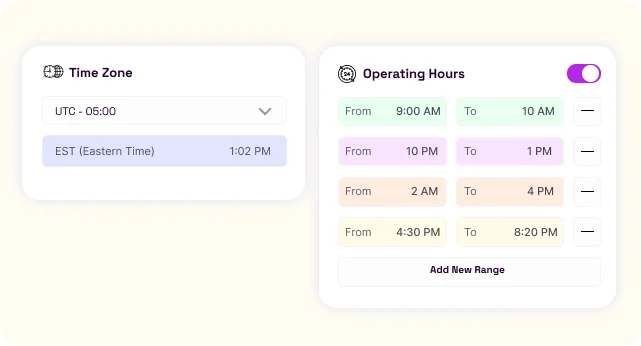
Settings panel displaying time zone selection alongside a menu for adding multiple custom operating hour time ranges.

Flexible Hours Across Time Zones

Chattrik lets you set operating hours in your preferred time zone and define multiple availability ranges within a single day. Whether your team works fixed schedules, split shifts, or rotations, chat availability can be customized to match real working hours. This ensures visitors always connect with your team at the right time, improving engagement and customer satisfaction.

Stay Available Without Being Online 24/7

Why Operating Hours is Essential

Operating hours are more than just schedules—they ensure your team delivers timely responses, sets clear expectations, and balances customer satisfaction with agent well-being. Here’s why they matter:

Instant Response Icon
Instant Response

Customers get help in, improving satisfaction.

Automated Messaging Icon
Automated Messaging

Visitors are never left in the dark—even when your team is offline.

Better Team Productivity Icon
Better Team Productivity

Agents can focus on live chats without being interrupted.

Set Customer Expectations Icon
Set Customer Expectations

Visitors know exactly when support is available.

Boost Conversion Rates Icon
Boost Conversion Rates

Engage visitors at the right time, turning more chats into customers.

Seamless Scheduling for Global Teams Icon
Seamless Scheduling for Global Teams

Support multiple time zones with flexible operating hour settings.

Reduce Missed Opportunities Icon
Reduce Missed Opportunities

Every visitor interaction is captured, ensuring follow-ups happen.

Stress-Free Support Management Icon
Stress-Free Support Management

Your team can maintain boundaries while keeping customer service consistent.

What Our Clients Say

Our clients love how much time and effort Operating Hours save, making every conversation faster, smoother, and more effective.

Emily Carter Customer
Emily Carter

Customer Support Manager

Setting operating hours has streamlined our support process—customers always know when we’re available, and our team can focus without interruptions

James Thompson Customer
James Thompson

E-commerce Director

Chattrik’s scheduling feature ensures we never leave a visitor waiting. It’s like having an always-on team without extra staff.

Daniel Brown Customer
Daniel Brown

Tech Support Lead

Chattrik’s Operating Hours have made scheduling effortless. Our customers are satisfied, and our team finally has clear boundaries.

Olivia Martinez Customer
Olivia Martinez

SaaS Customer Success Lead

We’ve seen a huge drop in missed chats since implementing operating hours. It keeps our team sane and customers happy

Michael Johnson Customer
Michael Johnson

Operations Manager

Automating availability with Chattrik is a game-changer. We provide timely support without worrying about off-hours inquiries

Frequently Asked Questions

Have questions? We’ve got answers. Here are the most common things people ask about Chattrik.

Operating hours define your teams working time with which customers can connect through Chattrik to initiate conversation.
This feature shows the customers, if your business hours match their current time and when the team is online to assist.
Yes, you can set specific operating hours on each day of the week.
Yes, you can include any upcoming holidays or non-working days in the operating hours section.
Yes, Chattrik supports the facility of operating hours according to your choice of time zone.
Visitors can view the offline messages that have been set or any other customized messages to engage visitors on holidays or holidays.
Yes, the operating hours for your business can be edited whenever necessary from your Chattrik account settings.
Yes, because operating hours set up helps your customer anticipate the next immediate interaction with your support staff.
Yes, based on the business structure, operating hours can be set for different departments.
The chat widget can be configured to show an “online” or “offline” state depending on whether operating hours are set or not.
The setting of operating hours can be simply managed from Chattrik account settings.
It helps the businesses set expectations for their customers and manage interactions in a systematic way.

Never miss a conversation, no matter the time.

WhatsApp Chat