Organize Your Support Teams Effortlessly

Create dedicated departments so every customer query reaches the right experts instantly.

What is Departments Feature?

With Departments, you can group agents into specialized teams like Sales, Support, or Billing, ensuring every customer reaches the right expert quickly. This reduces wait times, improves resolution speed, and boosts overall customer satisfaction. Manage team hours, set priorities, and track performance—all in one place for a smarter, more efficient support system.

How It Works

Departments simplify live chat management for teams of any size. Here’s how it works:

  • Group agents by function, expertise, or language.
  • Assign incoming chats directly to the appropriate department.
  • Track performance and workload for each team.

Empower teams to work smarter, not harder.
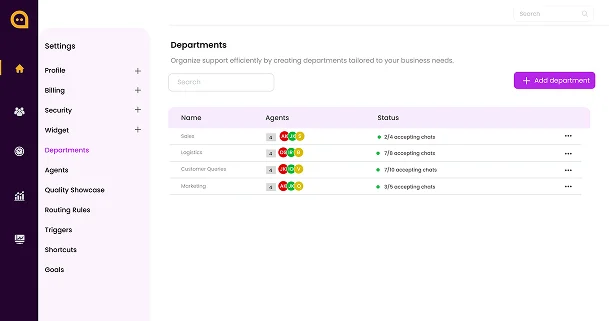
Chattrik dashboard interface showing the Departments creation and management overview panel.
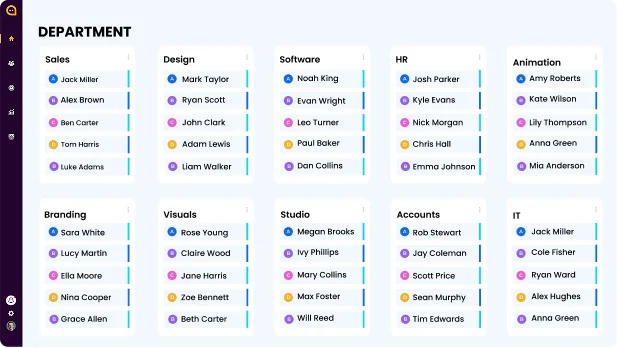
A matrix display of company departments showing individual assigned support agents.

Streamline Your Team’s Workflow

Departments let you structure your support team efficiently, ensuring specialized agents handle queries relevant to their skills. By organizing agents into dedicated teams, you can provide faster, more accurate support while keeping your operations smooth and transparent. With Departments, you can:

Key Features:
  • Assign agents by expertise, role, or language.
  • Set team-specific hours and availability.
  • Customize automated responses per department.
  • Track performance with detailed analytics.
  • Distribute workload evenly among agents.

Organize your teams and deliver expert support effortlessly.

Advantages of Departments Feature

Departments organize your support team for maximum efficiency, ensuring customers get the right help faster, workloads stay balanced, and teams collaborate seamlessly.

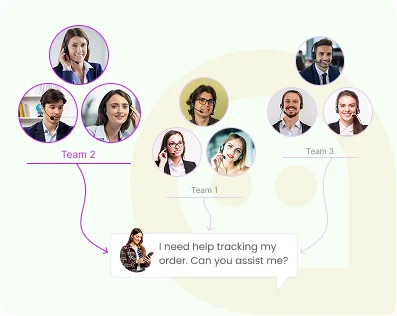
An explanatory diagram showing incoming customer chat queries being distributed to different service teams.

Right Team, Every Time

Automatically route queries to the team best suited to handle them.

A customer support agent working on a laptop alongside a performance gauge meter.

Boost Efficiency

Specialized teams reduce response times and improve resolution rates.

An organizational chart diagram showing collaborative connections between Marketing, Support, and Sales teams.

Seamless Collaboration

Departments help teams work together smoothly, sharing workload and insights.

Why This Feature is Essential

Departments ensure queries reach the right experts, boost resolution speed, balance workloads, and help teams collaborate and scale efficiently.

Targeted Support Icon
Targeted Support

Customers reach the right team every time.

Specialized Expertise Icon
Specialized Expertise

Departments ensure queries are handled by experts.

Faster Resolution Icon
Faster Resolution

Reduce wait times with focused teams.

Balanced Workload Icon
Balanced Workload

Distribute chats evenly among department members.

Scalable Support Icon
Scalable Support

Easily expand departments as your business grows.

Enhanced Collaboration Icon
Enhanced Collaboration

Teams work together within their department seamlessly.

Performance Insights Icon
Performance Insights

Monitor each team’s efficiency easily.

Custom Team Structure Icon
Custom Team Structure

Create departments based on function or language.

Frequently Asked Questions

Have questions? We’ve got answers. Here are the most common things people ask about Chattrik.

Teams can be grouped together by the function or role that their agents perform in the company.
Departments ensure that customer questions end up in front of the right department or team in the business.
You can create as many as needed for your business operations.
Some common examples include Sales, Support, Billing, and Tech Support.
Agents can be added to one or more departments based on what is required for them.
They automatically ensure that chats end up routed to the appropriate team to handle them.
Yes, any information for your departments can be updated at any time.
Every department can have an assigned set of agents for specific business functions.
Businesses of any size will be able to streamline and enhance their communications by creating separate departments.
There are reports that allow for monitoring and understanding of performance of each department.
By having specific teams dedicated to areas such as sales and billing, departments can improve workflow collaboration.
By using departments, you increase organizational efficiencies and ensure greater chat routing precision.

Start 30-day free trial at Chattrik

Explore premium chat features, boost support efficiency, and secure your conversations.

WhatsApp Chat