How to Restrict an IP in Chattrik

Chattrik’s IP restriction feature helps enhance security by allowing you to block unwanted IPs. This ensures only trusted visitors access your chat widget and services.

Chattrik’s IP Restriction feature gives you better control over security by allowing you to block or restrict access from unwanted IP addresses. This ensures your chat widget is only accessible from trusted networks while preventing misuse from unauthorized sources. You can add multiple IPs, toggle restrictions on or off, and customize the setup to match your needs.

Step 1: Log in to Your Dashboard
  • Log in to your Chattrik dashboard.
  • Navigate to Settings and select Account from the menu.
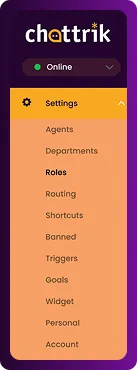
The Chattrik settings vertical navigation sidebar highlighting the Account option.
Step 2: Open the Security Tab
  • Go to Account → Security.
  • This tab helps you manage IP restrictions.
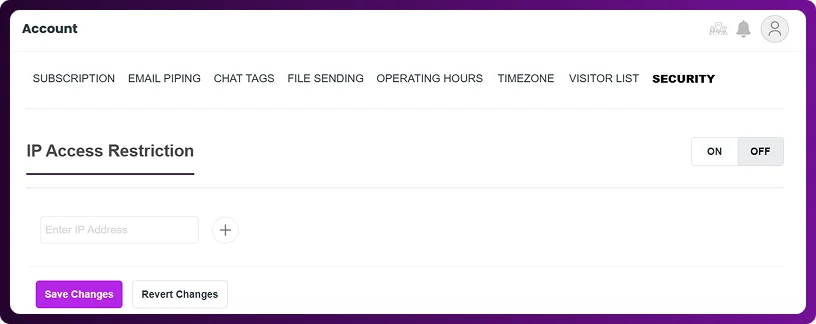
The Account page dashboard view with the Security tab active, showing the IP Access Restriction configuration section.
Step 3: Restrict IPs
  • Under the IP Access Restriction section, enter the IP addresses you want to block.
  • You can add multiple IPs at once.
  • Use the toggle to enable or disable restrictions as needed.

The IP Access Restriction entry panel featuring an interactive toggle switch and an Enter IP Address input box.
Step 4: Save Changes
  • After setting up restrictions, click Save Changes.
  • The blocked IPs will no longer have access to your chat widget.

A form action panel displaying side-by-side buttons labeled Save Changes and Revert Changes.
Frequently Asked Questions

Have questions? We’ve got answers. Here are the most common things people ask about IP Restrictions in Chattrik.

Yes, you can add and restrict multiple IP addresses at once in the security section.

Visitors from that IP won’t be able to access your chat widget or initiate conversations.

Yes, you can turn the restriction feature on or off anytime without deleting the saved IPs.

No, restricting an IP only blocks chat access; reporting and analytics remain unaffected.

Yes, simply delete the IP from the restriction list and save changes to allow access again.
WhatsApp Chat