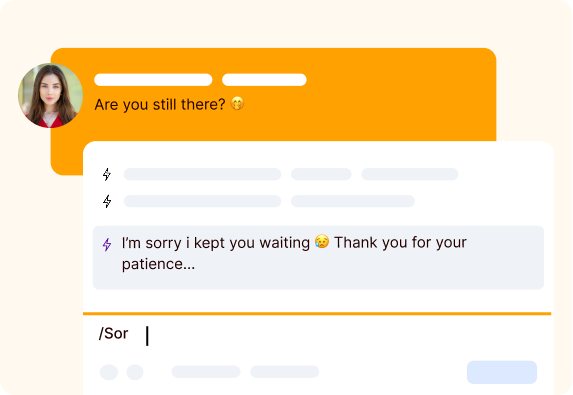
Shortcuts are quick-trigger text commands designed to help your team respond to frequent questions instantly and with minimal effort. By enabling agents to insert full, pre-written messages with just a few keystrokes, they dramatically speed up conversations, reduce repetitive typing, and maintain consistent, accurate communication across every interaction. With Shortcuts, your team can stay focused on resolving complex issues while keeping every exchange fast, seamless, and professionally delivered.
Setting up Shortcuts is simple, and once they’re ready, sending them is even easier. Delight your customers by providing fast, accurate replies every time, while saving your team valuable time.
Shortcuts make customer support faster, easier, and more consistent.
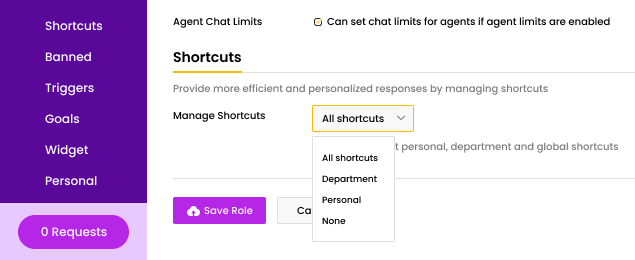
You can create up to 15,000 shortcuts in your account, grouped into three types—Personal Department, and Global. Personal shortcuts are created by agents or administrators for individual use, while Department and Global shortcuts are managed by administrators and shared across teams. Shortcut type is selected during creation and can be reassigned later based on permissions. Administrators control who can create or edit shortcuts through Chat roles, using the following permission tiers:
Boost productivity, accuracy, and customer satisfaction with these key benefits.
Reduce repetitive typing and respond to customers instantly.
Deliver the same accurate answers across your team.
Handle more chats without compromising quality.
Personalize messages with customer names or details.
Share and update responses across your support team.
New agents get up to speed quickly with ready-made replies.
Eliminate typos and misinformation in repeated messages.
Quick, accurate replies lead to happier customers.
Our clients love how much time and effort Shortcuts save, making every conversation faster, smoother, and more effective.